
White desk setup ideas that look expensive, not clinical
How to build a white desk setup that reads warm and expensive instead of sterile — warm vs cool white light, wood accents, matte surfaces, and hiding black tech and cables.

A white desk setup can look like a design magazine or like a dentist's office, and the difference comes down to four things: warm light instead of cool, a wood or oak accent to break up the white, matte surfaces instead of gloss, and getting the black tech and cables out of sight. Nail those and a cheap white desk photographs like an expensive one. Miss them and even a nice desk reads clinical.
See how it comes together in the desk setup galleries, and for the full build order start with the complete desk setup guide.
Warm white, not cool white
This is the single biggest lever. A white desk under cool, bluish light (4000K and up) looks like a lab bench. The exact same desk under warm light around 2700–3000K looks inviting. Cool light makes white surfaces glare and go slightly blue in photos; warm light gives them a soft, cream-adjacent tone that reads as expensive.
So skip the harsh overhead fixture and add a warm desk lamp or a bias light behind the monitor at 2700–3000K. If you shoot photos of the desk, avoid mixing a warm lamp with cool daylight from a window in the same frame — pick one temperature or the white goes patchy and cheap-looking.
Break up the white with wood
An all-white desk is where the clinical feeling comes from. White desk, white walls, white accessories, white everything, and suddenly it is a waiting room. The fix is one warm natural material to interrupt it. Oak, walnut or light ash does the most work: a wooden monitor stand, a small wood tray, a light oak shelf, or wooden desk legs under a white top.
You do not need much. One or two wood elements against the white is the entire trick, and it is why so many expensive-looking white desks are actually white-and-oak. If wood is your main move, the wooden desk setup ideas guide goes deeper on getting the tones right.
Matte beats gloss
Glossy white surfaces look cheap and show every fingerprint, smudge and dust mote under a desk lamp. A matte or satin white finish hides all of that and diffuses light softly instead of throwing a hard bright reflection back at you. If you are choosing a desk or a shelf, go matte. If you already own a gloss white desk, a large matte desk mat covers the working area and solves most of it.
On white, fingerprints and dust are the enemy. Matte finishes forgive them; gloss shows every one. Choose surfaces you will not be wiping down daily.
Hiding black tech on a white desk
Here is the problem nobody warns you about: on a white desk, every black object and every black cable stands out like a marker line. A black monitor, black keyboard and black mouse against white can look busy and disjointed instead of clean.
Two ways to handle it. The clean-and-simple route is to buy white or light-grey versions of the gear where it is easy — a white keyboard, a light mouse, a white monitor if the budget stretches — so the desk reads as one tone. The realistic route, since most of us already own black gear, is to keep the black tech but corral it: center it, keep it symmetrical, and above all get the black cables off the white surface, because a black cable snaking across white is the single most jarring thing in the frame. Route everything under the desk following how to hide cables under your desk.
A desk mat that photographs well
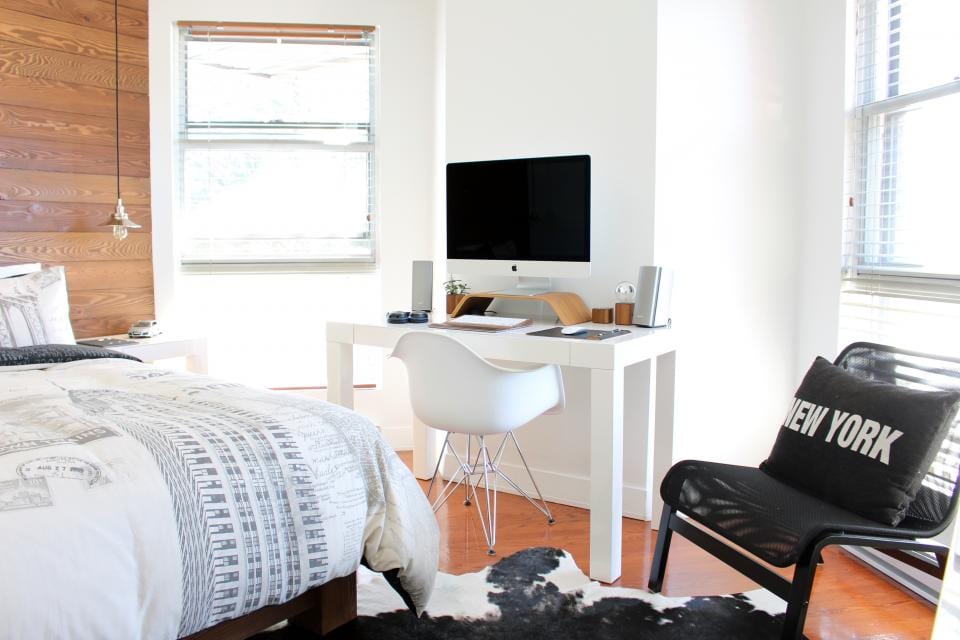
On a white desk the mat is doing real work. A white or pale-grey mat keeps the one-tone look and quietly hides the seam where a black keyboard meets the white surface, softening that contrast. A tan or light-oak-toned mat instead echoes your wood accent and warms the whole desk up. Either works; a stark black mat usually does not, because it drops a heavy dark rectangle into the middle of your clean white scene.
Whatever you pick, go large enough to sit under both the keyboard and the mouse. It defines the workspace, unifies the gear, and gives the camera a soft neutral base instead of a hard reflective white. A mat also breaks up the expanse of white so the desk does not read as one flat sheet, which is another small step away from the clinical look.
If you want the desk to feel warm rather than just clean, let the mat, the light and the wood accent all pull in the same direction. Warm mat, warm light, warm wood, and the white surface between them starts to look soft and expensive instead of stark.
Who it is for, and when to skip it
A white desk suits bright rooms, small spaces that benefit from the light feel, and anyone chasing a calm, gallery-style look. Skip it if your room gets very little natural light — white can go grey and flat in a dim space — or if you know you will not keep up with the occasional wipe-down, because white shows grime that darker surfaces hide.
Get the warm light, the wood accent, the matte surface and the hidden cables right, and a white desk stops looking clinical and starts looking like the calm, expensive setup you had in mind. Browse the desk setup galleries for arrangements to copy.
About this article
- Published by Ines Okafor — Ines Okafor writes about small-space workspaces and calm, low-clutter desk setups for The Desk Nook.
- Claims fact-checked against cited sources: Yes
Keep reading

The complete guide to building a desk setup (2026)
If you want the short version: build from the desk up , spend money where your hands and eyes touch the setup, and route the cables last but never skip them. A…

Minimalist desk setup ideas that stay clean in real life
A minimalist desk setup is not an empty desk. It is a desk where everything on it earns its place. The goal is a surface that feels calm the moment you sit…

A complete budget desk setup under $300 (2026)
You can build a genuinely comfortable desk setup for under $300 if you spend on the parts your hands and eyes touch and save everywhere else. Here's the whole…